# GET STARTED

## 1. Download GTA V

#### Steam: ▶️ [Link](https://store.steampowered.com/app/271590/Grand_Theft_Auto_V/)

## 2. Download FiveM

#### Go to ▶️ [Link](https://fivem.net)

Click on "DOWNLOAD CLIENT"&#x20;

<figure><img src="https://2630111524-files.gitbook.io/~/files/v0/b/gitbook-x-prod.appspot.com/o/spaces%2FRNdEcRwctKWkJrenmlkc%2Fuploads%2FJ3ZZVgiuQZfpObAmypmZ%2Ffivem.png?alt=media&#x26;token=69b85c5b-f231-4159-8cfc-bed998467b2d" alt=""><figcaption></figcaption></figure>

Click on “Sure, I Agree”

<figure><img src="https://2630111524-files.gitbook.io/~/files/v0/b/gitbook-x-prod.appspot.com/o/spaces%2FRNdEcRwctKWkJrenmlkc%2Fuploads%2FBp3TYSfdtCUBgUyKkoml%2Fagreement.png?alt=media&#x26;token=befe2de9-681d-499d-a06e-3144e4efcdcf" alt=""><figcaption></figcaption></figure>

Choose where you want to download FiveM to

<figure><img src="https://2630111524-files.gitbook.io/~/files/v0/b/gitbook-x-prod.appspot.com/o/spaces%2FRNdEcRwctKWkJrenmlkc%2Fuploads%2FaaRtMobhYTyJahSsrndu%2Fdownload.png?alt=media&#x26;token=d49c98a1-50b0-4360-b932-0ff412deaffd" alt=""><figcaption></figcaption></figure>

## 3. Setup FiveM

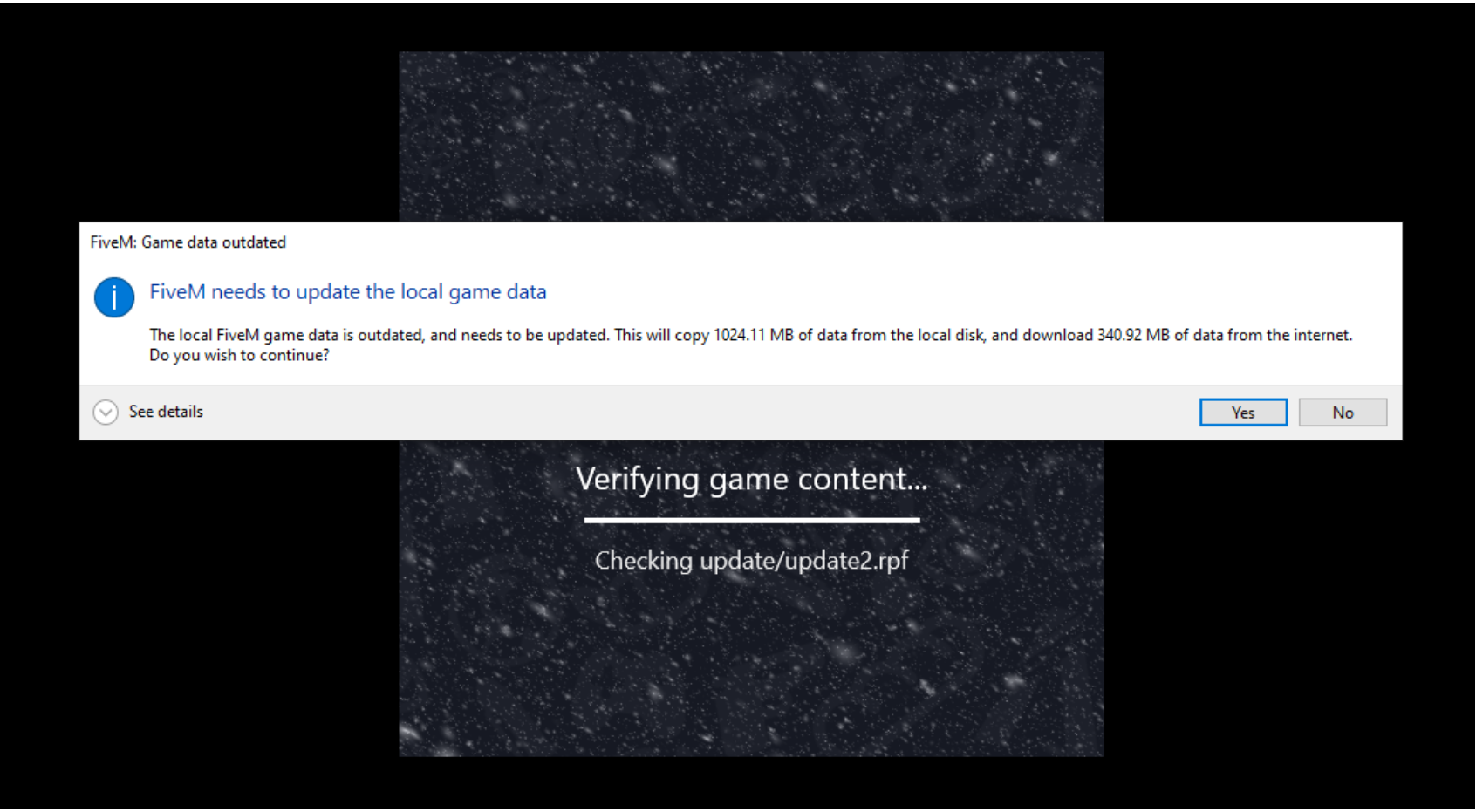
#### Launch FiveM.exe

Wait until it finished updating

<figure><img src="https://2630111524-files.gitbook.io/~/files/v0/b/gitbook-x-prod.appspot.com/o/spaces%2FRNdEcRwctKWkJrenmlkc%2Fuploads%2FDBSnZYgRBfZxVnXQkLRS%2Fupdate.png?alt=media&#x26;token=37687063-7a5d-4a2b-93e3-f96da5706443" alt=""><figcaption></figcaption></figure>

#### A window will pop up, asking you to locate your GTA V on your computer

<figure><img src="https://2630111524-files.gitbook.io/~/files/v0/b/gitbook-x-prod.appspot.com/o/spaces%2FRNdEcRwctKWkJrenmlkc%2Fuploads%2FOtf4Aa0NHsNrkfw1aaxs%2Ffile%20location.png?alt=media&#x26;token=78f8bd18-5d57-4c46-8ecd-75ea1bc72e0b" alt=""><figcaption></figcaption></figure>

### 3.1 Get GTA V file location

#### Get GTA V folder on Steam:

Right-click onto GTA V > Manage > Browse local files

<figure><img src="https://2630111524-files.gitbook.io/~/files/v0/b/gitbook-x-prod.appspot.com/o/spaces%2FRNdEcRwctKWkJrenmlkc%2Fuploads%2FR5c4DLh7vSsDGJCZ6OzE%2Fsteam.png?alt=media&#x26;token=460072bd-1c21-4019-ba8d-e768b8c163e6" alt=""><figcaption></figcaption></figure>

#### Copy the directory and paste it into the window

<figure><img src="https://2630111524-files.gitbook.io/~/files/v0/b/gitbook-x-prod.appspot.com/o/spaces%2FRNdEcRwctKWkJrenmlkc%2Fuploads%2FysJYJswV6N787CPkGVgl%2Fcopy.png?alt=media&#x26;token=ebe382dc-18d7-445f-a5ff-27d6d2f31fee" alt=""><figcaption></figcaption></figure>

#### Choose GTA5.exe

<figure><img src="https://2630111524-files.gitbook.io/~/files/v0/b/gitbook-x-prod.appspot.com/o/spaces%2FRNdEcRwctKWkJrenmlkc%2Fuploads%2F2JR6Cl8nLGW8WwQlCOQU%2Fchoose.png?alt=media&#x26;token=38fce1ec-ef1d-42f4-b53c-a6176252a6bd" alt=""><figcaption></figcaption></figure>

#### Click Yes

<figure><img src="https://2630111524-files.gitbook.io/~/files/v0/b/gitbook-x-prod.appspot.com/o/spaces%2FRNdEcRwctKWkJrenmlkc%2Fuploads%2FeP0sNcECSDkTNG1zqAAW%2Fclick.png?alt=media&#x26;token=7f3d58b5-e426-4401-8b71-2e0d7fd8a69a" alt=""><figcaption></figcaption></figure>

### 3.2 Log in Social Club through FiveM

After finished downloading, FiveM will ask you to log in to Social Club

<figure><img src="https://2630111524-files.gitbook.io/~/files/v0/b/gitbook-x-prod.appspot.com/o/spaces%2FRNdEcRwctKWkJrenmlkc%2Fuploads%2Fk7lzRwyX5C3LoIUgnkEi%2Fsocial.png?alt=media&#x26;token=17e7a9d1-b944-408f-bd81-908841ee7d60" alt=""><figcaption></figcaption></figure>

Sign up an Social Club account ▶️ [Link](https://signin.rockstargames.com/create/date-of-birth?cid=socialclub)

{% hint style="warning" %}

#### NOTE: FOR PLAYING FIVEM, YOUR SOCIAL CLUB ACCOUNT MUST HAVE GTA V ACTIVATED. OTHERWISE YOU CANNOT GET IN FIVEM

{% endhint %}

### 3.3 Log in Cfx.re account

Click "Link account"

<figure><img src="https://2630111524-files.gitbook.io/~/files/v0/b/gitbook-x-prod.appspot.com/o/spaces%2FRNdEcRwctKWkJrenmlkc%2Fuploads%2FXaUMllCZanSZRZc7OzNf%2Flink%20cfx.png?alt=media&#x26;token=a01469a1-44b6-462f-b14f-503778c8ed68" alt=""><figcaption></figcaption></figure>

Click "Log in via Browser"

<figure><img src="https://2630111524-files.gitbook.io/~/files/v0/b/gitbook-x-prod.appspot.com/o/spaces%2FRNdEcRwctKWkJrenmlkc%2Fuploads%2FMGwv6enmetDBMQYiJ1Gv%2Flogin%20cfx.png?alt=media&#x26;token=166c5187-0772-46cf-90ad-808800e24789" alt=""><figcaption></figcaption></figure>

Click onto "Create your account"

<figure><img src="https://2630111524-files.gitbook.io/~/files/v0/b/gitbook-x-prod.appspot.com/o/spaces%2FRNdEcRwctKWkJrenmlkc%2Fuploads%2FFfiBUMUvIdlcafoJGdqA%2Fcreate.png?alt=media&#x26;token=47942812-2d65-409c-afb8-d762a5996431" alt=""><figcaption></figcaption></figure>

After filled in all the required field, Click "Create your account"

<figure><img src="https://2630111524-files.gitbook.io/~/files/v0/b/gitbook-x-prod.appspot.com/o/spaces%2FRNdEcRwctKWkJrenmlkc%2Fuploads%2Fh681zAY2QCjb5Wq0qTvB%2FCreate%20account.png?alt=media&#x26;token=50a5913b-8b3e-4dfb-b449-8039825869dd" alt=""><figcaption></figcaption></figure>

Verify your email

<figure><img src="https://2630111524-files.gitbook.io/~/files/v0/b/gitbook-x-prod.appspot.com/o/spaces%2FRNdEcRwctKWkJrenmlkc%2Fuploads%2F8DPIaxl6hZoWmdaGaDo4%2FActivate%20email.png?alt=media&#x26;token=63d9d5b3-af3e-4a65-b657-190fffb96df3" alt=""><figcaption></figcaption></figure>

{% hint style="warning" %}

#### NOTE: In case you don't receive any email, either click "Resend Activation Email" or check your Spam Folder

{% endhint %}

Back to FiveM, Log In to your account

<figure><img src="https://2630111524-files.gitbook.io/~/files/v0/b/gitbook-x-prod.appspot.com/o/spaces%2FRNdEcRwctKWkJrenmlkc%2Fuploads%2FP0TFp3FEfKpNZQA2mDsk%2FLogin.png?alt=media&#x26;token=a8501a3d-e8ee-441d-807c-54cec98fadf3" alt=""><figcaption></figcaption></figure>

If you see this, you are success

<figure><img src="https://2630111524-files.gitbook.io/~/files/v0/b/gitbook-x-prod.appspot.com/o/spaces%2FRNdEcRwctKWkJrenmlkc%2Fuploads%2F8aLK6FWkcn5Sul88229T%2FSuccess.png?alt=media&#x26;token=4ddd745d-c3ee-49b8-b67d-6478d6787f54" alt=""><figcaption></figcaption></figure>

Before you start you must make sure you are connected to our discord via the link&#x20;

{% embed url="<https://discord.gg/5JHAmNQ8NX>" %}

YOU MUST MAKE SURE YOU KEEP DISCORD OPEN WHILE YOU PLAY GTFUTU

Now get back FiveM and press F8, a console display

<figure><img src="https://2630111524-files.gitbook.io/~/files/v0/b/gitbook-x-prod.appspot.com/o/spaces%2FRNdEcRwctKWkJrenmlkc%2Fuploads%2FZjJ6Fle8T8oW72Vl80I4%2F1.png?alt=media&#x26;token=a0433c71-2b73-4dab-a87f-93d0b961e3b7" alt=""><figcaption></figcaption></figure>

Type "connect gtafi.xyz" in console to connect out server&#x20;

<figure><img src="https://2630111524-files.gitbook.io/~/files/v0/b/gitbook-x-prod.appspot.com/o/spaces%2FRNdEcRwctKWkJrenmlkc%2Fuploads%2FxQFQNXBNyEiwQHJtmyT6%2F1.png?alt=media&#x26;token=e99b3d92-0a61-43e3-9718-9db0b878056c" alt=""><figcaption></figcaption></figure>

When you see this screen is success. play better and get more, if you're rich in the game, you'll be rich outside.

<figure><img src="https://2630111524-files.gitbook.io/~/files/v0/b/gitbook-x-prod.appspot.com/o/spaces%2FRNdEcRwctKWkJrenmlkc%2Fuploads%2Fnx5Ghyv26uNmJeqPY2rv%2F1.png?alt=media&#x26;token=4aab6446-1e75-42c7-9e2a-3c7de312be28" alt=""><figcaption></figcaption></figure>

✅ LET'S GET RICH